 ProductReveal
About this product
Timestamp Rocks: A Practical Discord Time Converter
Discord makes it easy to bring global communities together, but scheduling an event across multiple time zones can still be confusing. A time written as “8 PM” only works when everyone knows which location it refers to. Timezone abbreviations, daylight-saving changes, and manual offset calculations can easily cause people to arrive an hour early or late.
Timestamp Rocks is a focused browser tool designed to solve this problem. It converts a selected date, time, and timezone into Discord’s native timestamp syntax. Once the generated code is pasted into Discord, every viewer sees the same moment displayed in their own local timezone and language.
How Timestamp Rocks Works
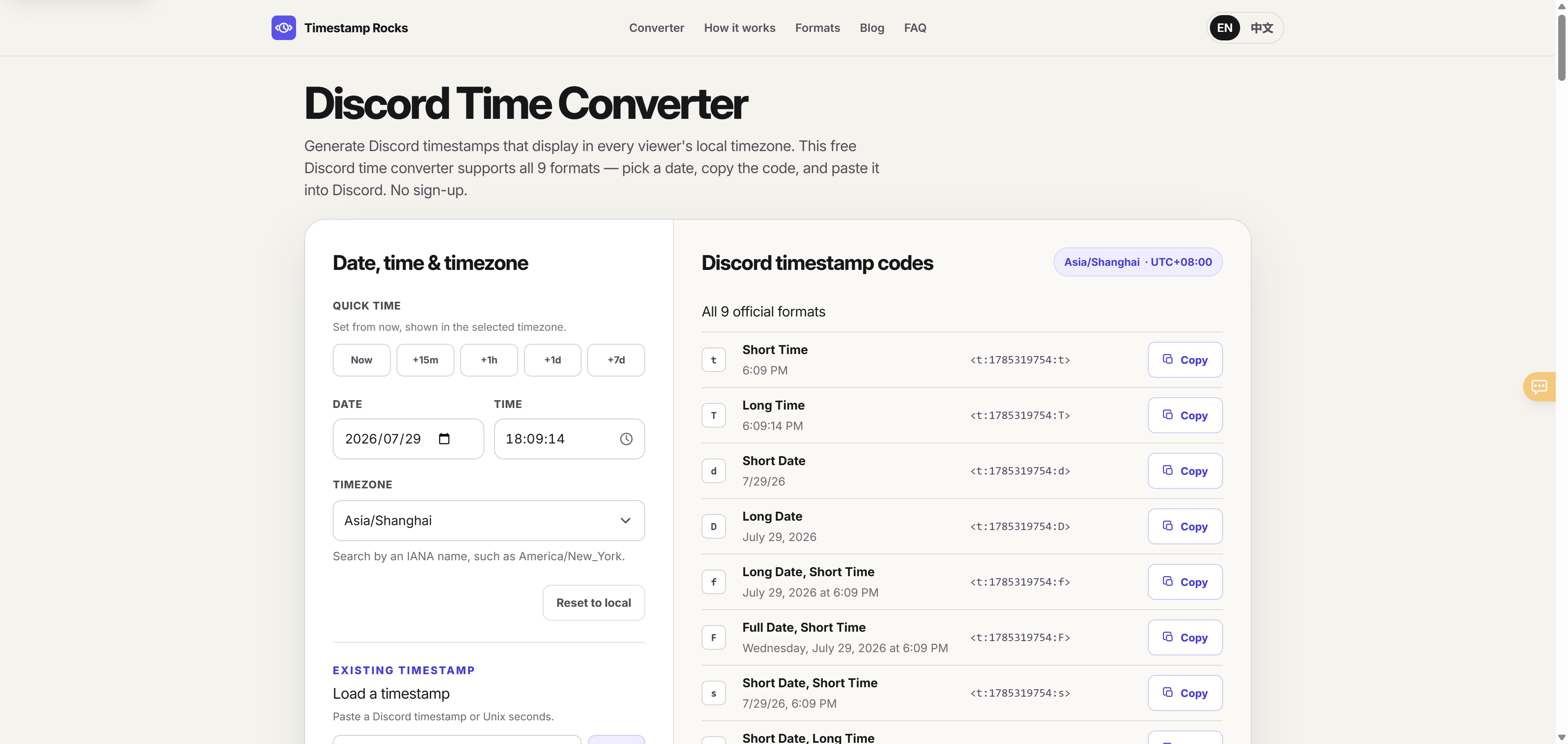
The workflow is straightforward. Choose a date, enter a time, and select the source timezone. Timestamp Rocks immediately generates the official Discord timestamp formats, including short time, long time, short date, long date, combined date-and-time formats, and relative time.
Each format includes a live preview, the raw Discord timestamp code, and its own copy button. This makes it easy to choose the exact output needed without manually highlighting or editing the code.
The tool also provides quick-time shortcuts for common scheduling needs, including now, fifteen minutes from now, one hour from now, tomorrow, and seven days from now. Users who already have a Discord timestamp can load it back into the converter to inspect or modify its underlying date and time.
Timezone and Daylight-Saving Support
One of the most useful parts of Timestamp Rocks is its timezone handling. Instead of relying only on fixed UTC offsets, it supports IANA timezone names such as America/New_York, Europe/London, and Asia/Shanghai.
This distinction matters because fixed offsets do not reliably represent daylight-saving changes throughout the year. Timestamp Rocks calculates the correct offset for the selected timezone and date.
It also checks for difficult daylight-saving transitions. If a local time does not exist because the clock moves forward, or occurs twice because the clock moves backward, the tool warns the user instead of silently generating a potentially misleading result. This is particularly useful for moderators and organizers scheduling events several weeks or months in advance.
Designed for Speed and Privacy
Timestamp Rocks does not require an account, email address, installation, or payment. The conversion runs directly in the browser, keeping the workflow fast and avoiding the need to send event details to a calculation server.
The interface is available in English and Chinese. It is designed as a lightweight utility rather than a complicated calendar platform, so users can open the site, generate a timestamp, copy it, and return to Discord.
The website also includes a dedicated Discord countdown generator. It creates a message containing a relative timestamp that updates automatically inside Discord. Supporting guides explain Discord timestamp syntax, timezone messages, bot timestamps, and related implementation patterns.
Who Is It For?
Timestamp Rocks is useful for Discord moderators, gaming groups, international communities, online course organizers, livestream creators, and distributed development teams. It can also help Discord bot developers understand and test timestamp output before inserting it into a message or embed.
The tool has deliberate limitations. It is not a shared calendar, does not save event history, and does not send reminders. Teams needing invitations, recurring events, attendance tracking, or account-based collaboration will still need a calendar or event platform.
Timestamp Rocks turns timezone conversion into a simple and repeatable workflow: select the source time, copy a Discord timestamp, and paste it into a channel.
Support for all nine official formats, IANA timezones, daylight-saving validation, live previews, quick-time controls, and one-click copying makes it more reliable than manually calculating offsets. For communities that regularly ask “What time is that for me?”, Timestamp Rocks provides a practical answer without adding another account or complicated scheduling system.
Key features
- All 9 Discord Timestamp Formats
- Smart Daylight Saving Handling
- Complete IANA Timezone Support
- Browser-Based & Privacy-First
- Live Preview & One-Click Copy
Reviews
Reviews are moderated before appearing publicly.
No reviews yet — be the first to share your experience.