 ProductReveal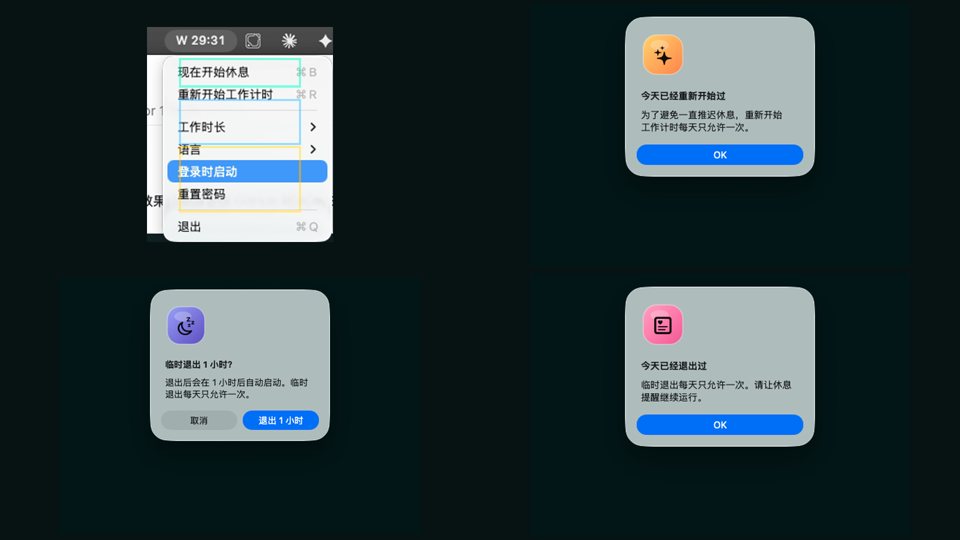
About this product
Screen Break is a macOS break reminder for people who already know they should rest, but still dismiss ordinary timers. The app lives quietly in the menu bar and keeps a simple rhythm: work for a chosen amount of time, then step away for a guided rest. Its value is not another productivity dashboard. Its value is a calm but firm interruption that helps the user actually leave the keyboard for a few minutes.
The strongest part of Screen Break is the full-screen rest flow. When a break starts, the app covers every display with a clean rest screen, countdown, breathing prompt, and small movement suggestion. That matters because many timer apps are easy to ignore. A tiny notification disappears under windows, a menu bar number becomes invisible, and a user can keep typing without changing behavior. Screen Break turns the break into a real moment. It does not feel harsh, but it is intentionally harder to dismiss.
The product also understands that computer time is not always active work time. If the user has been away from the Mac for a meaningful idle period, the app resets the work timer instead of forcing a break immediately when the user returns. This is a thoughtful detail. Someone who left the desk to get water or answer the door should not come back and instantly face a lock screen. The reminder should protect real rest, not punish absence.
Another useful detail is busy auto-defer. Screen Break can detect common busy contexts such as media playback, meeting software, presentation-like full-screen use, or gaming-style activity. When those signals appear, it can delay the rest window and try again later. This makes the app more practical for daily use, especially for remote workers, students, founders, designers, writers, and developers who may be in calls or presentations.
Screen Break is deliberately small. It does not ask users to build a complex wellness system, track every habit, or manage a long list of projects. The main settings are the ones most people need: work duration between 30 and 50 minutes, a 5 minute rest, multilingual interface support, launch at login, password reset, manual restart limits, and a controlled temporary quit. Those limits are important. They make the app useful for users who want friendly friction rather than unlimited escape buttons.
The tone of the app is another pleasant choice. Alerts use cute custom icons rather than the default macOS folder icon, and the rest messages are gentle instead of scolding. That helps the product feel supportive. A break reminder can easily become annoying if it sounds like a supervisor. Screen Break aims for a softer voice while still holding the boundary.
There are a few tradeoffs. Because it is a local macOS utility, distribution quality matters. Users may prefer a notarized Developer ID build before adopting it in a work environment. The default unlock password should also be changed after installation. Those are normal early-stage desktop app concerns, not dealbreakers, but they are worth noting for trust.
Overall, Screen Break is a focused tool with a clear promise: make healthy screen breaks happen in real life. It is best for Mac users who ignore ordinary timers, sit too long, and want a reminder with just enough structure to interrupt the loop without turning wellness into another complicated productivity project.
Key features
- Full-screen guided rests across every display
- Smart idle reset when the user has already stepped away
- Busy auto-defer for calls, media, presentations, and full-screen activity
- Adjustable 30-50 minute work duration with 5 minute rests
- Multilingual macOS menu bar experience with friendly skip limits
Pros
- Simple menu bar workflow
- Harder to ignore than ordinary timer notifications
- Thoughtful idle and busy detection
- Friendly copy and visual alerts
Cons
- Early public build is not Developer ID notarized yet
- Default unlock password should be changed after install
Reviews
Reviews are moderated before appearing publicly.
No reviews yet — be the first to share your experience.