 ProductReveal
imagetolatex
Convert a math screenshot or picture to LaTeX and editable Word equations online.
About this product
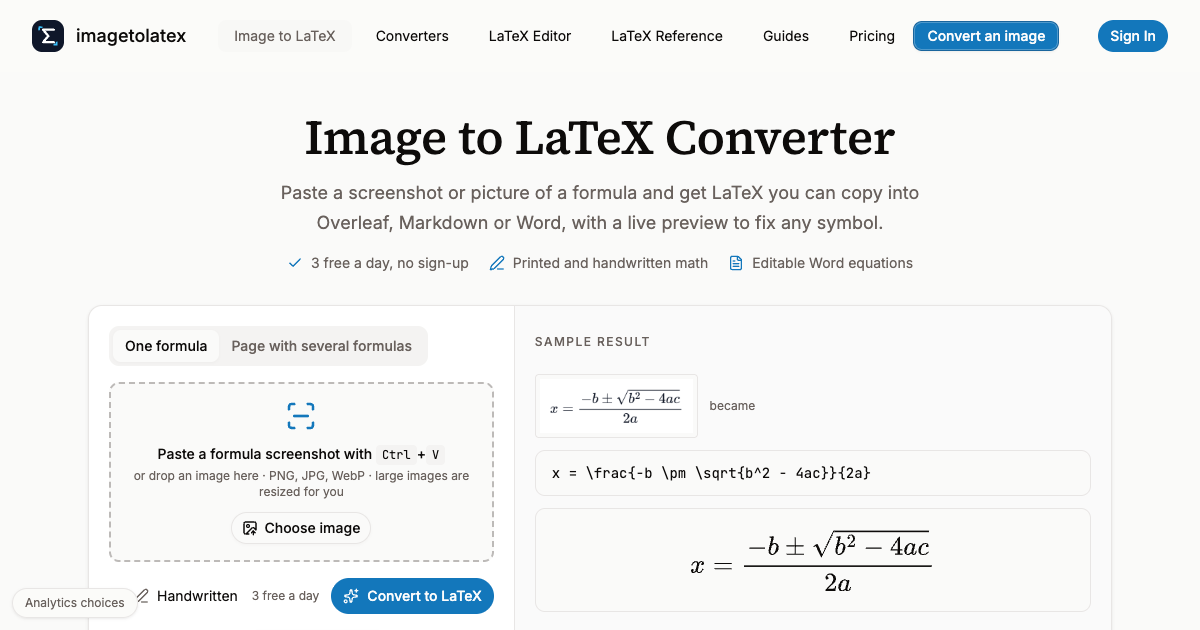
imagetolatex is a browser tool for the specific problem of having math in a picture and needing it as text. A formula pasted into a slide, a photo of a textbook page, a whiteboard shot from a lecture, or a scanned worksheet all share the same dead end: the equation is visible but not editable. Retyping it in LaTeX by hand is slow and error prone, especially with nested fractions, integrals and matrices. imagetolatex takes the image, recognises the structure, and returns LaTeX that can be copied, checked against a live preview, and pasted into Overleaf, Markdown, Word or any editor that accepts an equation.
The first thing worth knowing is that the product separates printed formulas from handwriting. Printed formulas are recognised free each day, which makes the tool usable for a quick conversion without thinking about credits. Handwriting, pages containing several formulas, and whole documents sit behind credits. That split is sensible: printed math is the easy case and the common one, while handwriting and multi-formula pages are the cases where the recognition work is genuinely harder.
The flow is short. You upload or paste an image, the tool returns LaTeX, and a preview renders the result so you can compare it against the original before using it. The preview matters more than it sounds. Recognition errors in math are not typos you can spot by reading; a misplaced brace changes the meaning of an expression and still looks plausible. Seeing the rendered formula next to the source image is the fastest way to catch thaBeyond single images, imagetolatex converts whole PDF and Word documents into LaTeX, Word, Markdown or Excel. This is the part that changes the tool from a convenience into something a department could use. Converting a problem set, a lab report or a set of lecture notes one formula at a time is tedious; converting the document in one pass is the difference between a task you do and a task you avoid.
There are also free side tools that do not require an account: a LaTeX equation editor for building a formula from scratch, a LaTeX table generator, and a reference of common LaTeX symbols. None of these are the main product, but they remove the need to keep three browser tabs open while writing.
Pricing follows a credit model. The daily free allowance for printed formulas covers casual use. Handwriting, multi-formula pages and document conversion consume credits, and credits are what you buy when the free allowance is not enough. There is no requirement to install anything, and the conversion happens in the browser, so a Chromebook or a lab machine works as well as a laptop.
The limits are worth stating plainly. Recognition quality depends on image quality: a sharp, straight, well-lit photo converts far better than a skewed phone shot with a shadow across the page. Very dense pages with dozens of small formulas are harder than a single displayed equation. And as with any OCR, the output should be checked before it goes into a paper or a submitted assignment, particularly when the formula is long.
For students, teachers and researchers who work with math, imagetolatex removes a repeated interruption. Instead of switching from reading to typing whenever an equation appears, you capture it and move on. For anyone converting a stack of documents, the batch path is the reason to use it rather than a general-purpose OCR tool that returns text with the math flattened into unreadable characters.t.
Key features
- imagetolatex
- Turns a math screenshot or photo into LaTeX with a live rendered preview
- Recognises handwritten formulas and pages with several formulas using credits
- Converts whole PDF and Word documents to LaTeX, Word, Markdown or Excel
- Includes a free LaTeX equation editor, table generator and symbol reference
Pros
- Printed formulas convert free every day
- Live preview makes recognition errors easy to catch
- Batch conversion handles whole PDF and Word documents
- Side tools cover tables, symbols and manual editing
Cons
- Handwriting and multi-formula pages need credits
- Quality depends heavily on a sharp, straight image
- Long formulas still need a human check before use
Reviews
Reviews are moderated before appearing publicly.
No reviews yet — be the first to share your experience.