 ProductReveal
ColoringPagesTools
Free printable coloring pages and coloring books as A4 or US Letter PDFs, plus an AI coloring page generator.
About this product
ColoringPagesTools is two products in one place: a library of free printable coloring pages and coloring books, and an AI generator that turns a written idea into a private coloring page. That combination is more useful than either half on its own. A parent can print something in two minutes when a child needs an activity now, and can also make a page for a specific request that no library would ever cover.
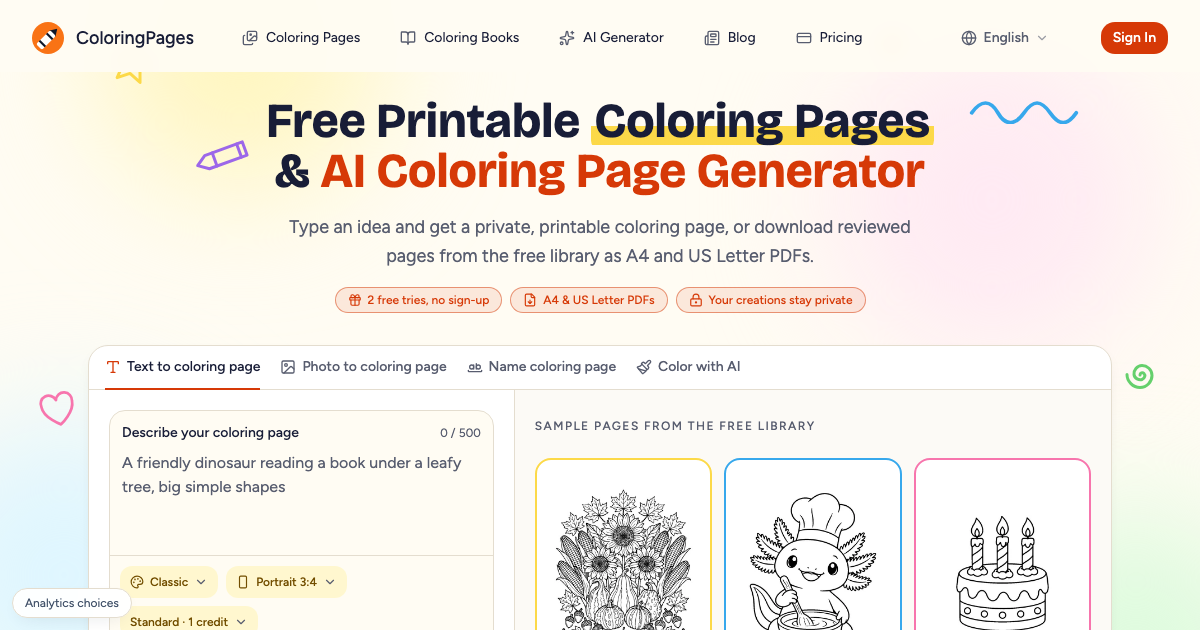
The library is organised rather than dumped. Every page is labelled by theme, difficulty and age, so you can judge whether a design suits a five-year-old or an adult who wants fine detail. Downloads come as clean A4 or US Letter PDFs without watermarks, which matters if you are printing for a classroom or a co-op and do not want a logo in the middle of the sheet. The sample pages on the home page give a fair idea of the drawing style before you commit paper to anything.
For browsing, the site is straightforward: pick a theme, open a page, print it. There is no account requirement for the free library, and the free printable pages stay free regardless of whether you ever pay for anything. That last point is stated on the pricing page rather than buried, which is the right place for it.
The AI side is where the product differs from a plain worksheet site. You describe what you want in up to 500 characters, choose a style, choose a page shape, and generate. The style list covers the practical range: classic line art, simple outlines for young children, cartoon, cute, anime-inspired, adult, easy, detailed and mandala. Page shape includes portrait, square, landscape, tall, wide, phone and widescreen, so a page can be printed or used on a screen without awkward cropping. Quality is split into standard at one credit and high at two credits, with one page per generation.
The output is deliberately private. Pages you generate do not join the public library, which is the correct default when someone is making a page for a child, a classroom or a personal project. Both PNG and PDF downloads are offered, so the same result can go to a printer or into a document.
There are also photo and name modes on the same page, which extend the tool beyond description-only prompts. The name mode is the kind of small feature that gets used constantly in families and early-years classrooms, and it is visible on the home page rather than hidden behind a menu.
Pricing is honest about what is free and what is not. The free library stays free. The AI generator starts with two free tries and no sign-up, which is enough to see whether the output style suits you. After that, credits are needed: subscriptions at $6.99, $12.99 and $29.99 per month bundle unlimited library downloads with monthly credits, and one-time credit packs are available for people who only need a handful of custom pages. Credits are reserved when a generation starts and used once a printable result is delivered.
Limits worth knowing: the generator produces one page per run, so a multi-page coloring book means several runs; the description field caps at 500 characters; and the AI output still needs a human look before printing for a group, as with any generated image.
For parents, teachers and activity organisers, ColoringPagesTools is worth bookmarking for the free library alone, and the generator is a sensible upgrade when the request is specific. The two free tries make the paid side testable before any commitment.
Key features
- Free printable coloring pages and coloring books labelled by theme, difficulty and age
- Clean A4 or US Letter PDF downloads without watermarks
- AI generator that turns a written idea into a private coloring page with PNG and PDF output
- Style and page-shape controls, from simple outlines to detailed mandala, portrait to widescreen
- Two free AI tries with no sign-up, and the free library stays free whether or not you subscribe
Pros
- Free library stays free with no account needed
- A4 and US Letter PDFs without watermarks
- AI generator has two free tries and keeps pages private
Cons
- AI generation costs credits after the free tries
- One page per generation, so a book needs several runs
Reviews
Reviews are moderated before appearing publicly.
No reviews yet — be the first to share your experience.