 ProductReveal
About this product
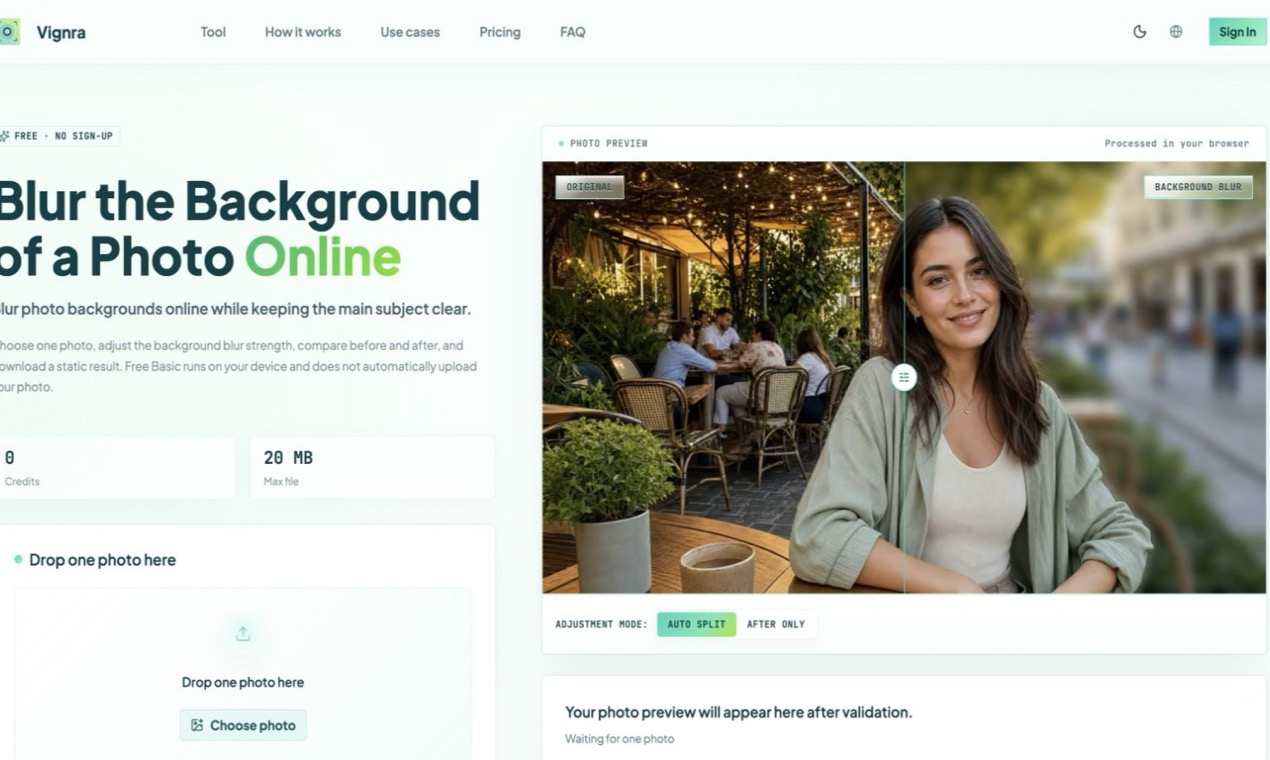
Blur Background is a focused browser-based image utility for people who need to soften or remove distracting photo backgrounds without setting up a desktop editing application. The product addresses a common production task: preparing a portrait, profile image, product photo, presentation visual, or social post so that the main subject is easier to see. Its narrow scope makes the workflow approachable for users who do not want to learn a full design suite.
The first part of the experience is intentionally straightforward. A user brings an image into the tool, chooses the background operation, reviews the separation between subject and scene, and exports the result for the destination where it will be used. That sequence is useful for quick jobs because it reduces the number of controls competing for attention. It also makes the tool easier to evaluate: the important questions are whether the subject remains intact, whether difficult edges look natural, and whether the output resolution is appropriate for the final layout.
Background processing is most convincing when it handles fine hair, translucent objects, soft shadows, and low-contrast boundaries. These are the places where a simple mask often looks artificial. Blur Background is best used with a short quality-control pass after the automatic result. Reviewing edges at full size, checking the subject against both light and dark backgrounds, and preserving believable contact shadows can turn a technically correct cutout into a visual that feels natural.
The product can fit several practical workflows. A small business can create more consistent product cards. A job seeker can prepare a cleaner profile image. A presenter can reduce clutter behind a person in a slide. A content creator can make a reusable subject image before producing platform-specific crops. In each case, keeping one clean master and exporting separate sizes later helps avoid repeated compression and unnecessary quality loss.
Privacy and convenience are also relevant for browser tools. Users should review the product's current processing and retention information before uploading sensitive photographs, just as they would with any online image service. For ordinary creative assets, the browser delivery model removes installation friction and makes the workflow accessible from a typical modern computer.
The strongest use case is not heavy compositing or professional retouching. It is the recurring, time-sensitive task where a person needs a cleaner background treatment and wants to move on to the rest of the design. Advanced editors will still provide more control over masks, color spill, and hand-painted corrections, while Blur Background emphasizes speed and a clear outcome.
Overall, Blur Background is a useful specialist tool for simple photo preparation. Its value comes from focusing on one visible problem, keeping the process understandable, and producing an asset that can be reused across portraits, product visuals, presentations, and social layouts. Users will get the best results from a clear source image, a brief edge review, and an export sized for the actual publishing destination.
For teams that process many images, consistency is the main operational benefit. A simple naming convention, an agreed crop ratio, and the same background treatment across a set can improve a catalog more than adding a different visual effect to every item. It helps to record the intended output dimensions before editing and to compare several completed images side by side. This exposes variations in edge softness, framing, and shadow treatment that may be hard to notice when each image is reviewed alone. The tool therefore works best as one step inside a small repeatable publishing checklist rather than as an isolated effect.
Key features
- Browser-based background blur and removal
- Focused workflow for portraits and product visuals
- Useful edge review at full image resolution
- Reusable exports for multiple publishing formats
- No desktop editor installation required
Reviews
Reviews are moderated before appearing publicly.
No reviews yet — be the first to share your experience.